
Every team running Meta lead ads in India hits the same wall. The dashboard looks great: cost per lead goes from ₹120 to ₹60 to ₹35. Then the sales team says half the numbers don’t pick up, a quarter never filled any form, and the rest “were just checking”.
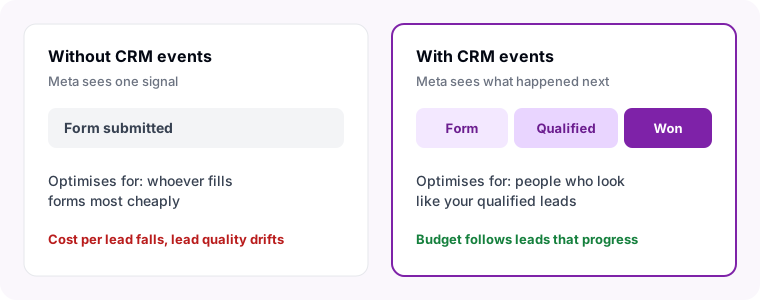
Meta isn’t broken. It is doing exactly what you asked. If the only thing it ever hears is “someone submitted the form”, it will find the people most likely to submit forms, as cheaply as possible. Those are rarely the people most likely to buy.
The fix is to tell Meta what happened after the form. That is what the Conversions API for CRM does.
Why Lead Ads Drift Toward Low-Quality Leads
A lead ad campaign with the default goal optimises for form submissions. Meta’s delivery system tests audiences, keeps the ones that produce the most submissions per rupee, and shifts budget toward them. Three things push it toward the wrong people:
- Instant forms are easy to fill. Pre-filled name and phone fields mean a tap or two is enough. Curious scrollers and accidental taps count the same as serious buyers.
- Cheap audiences win the auction. The people who fill forms most cheaply are often the least likely to buy, and nothing tells Meta that.
- The feedback stops at the form. Your team learns within a day which leads were real. Meta never does, so it keeps spending on more of the same.
What the Conversions API for CRM Does
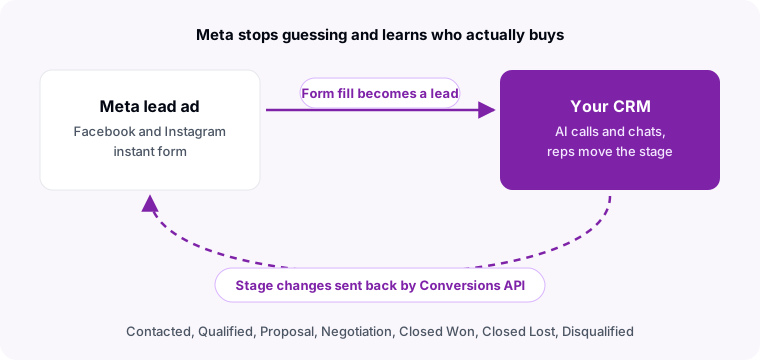
The Conversions API (CAPI) lets a server send events straight to Meta. The CRM version is built for lead ads: each time a lead moves stage in your CRM, you send Meta an event with the lead’s Meta lead ID and the new stage. Meta joins it to the original ad click and learns which audiences, ads and placements produce leads that progress.
Once Meta has a few weeks of these outcomes, you can switch a campaign’s performance goal to conversion leads and pick the stage to optimise for, such as Qualified. From then on Meta spends to find people who look like the leads your team qualified, not the ones who just filled a form.
Why Most Teams Never Set It Up
The idea is simple. The plumbing is not, which is why most Indian businesses running lead ads still optimise for form fills.
- The Meta lead ID has to survive. Every event must carry the ID Meta gave that submission. If leads arrive by CSV export or a Zapier step that drops the ID, there is nothing to send.
- Stage changes have to be captured everywhere. A stage changed on the web, on a phone after a call, or by an automation all has to produce an event, once, without duplicates.
- Timing matters. Meta ignores CRM events backdated more than seven days, so a weekly batch upload loses data.
- Personal data must be hashed. Email and phone go to Meta as SHA-256 hashes, never in plain text.
How Sahay Sends Your CRM Stages to Meta
If your Meta lead ads already flow into Sahay, the loop closes on its own. Every stage change on a lead that came from a Meta lead ad is sent to your own Meta dataset within moments, whether a rep moved it on the web, on the Android app after a call, or the AI moved it after qualifying the lead on a call or chat.
| What Meta needs | What Sahay does |
|---|---|
| The Meta lead ID | Kept on every lead captured from your lead forms, even when it merges with an existing contact. |
| A match key | The lead’s email and phone, SHA-256 hashed before sending. |
| Fresh events | Sent as each stage changes, never older than Meta’s seven-day window. |
| No double counting | Each stage change has one event ID, so a retry is deduplicated by Meta. |
| Negative signals too | Closed Lost and Disqualified are sent as well as Qualified and Closed Won, so Meta learns what to avoid. |
Set It Up in Four Steps
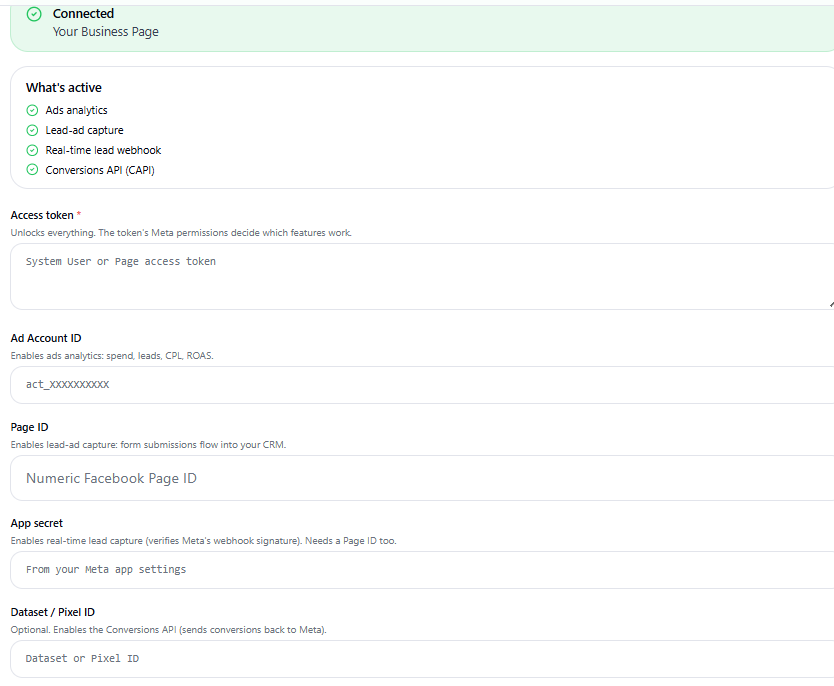
- Connect Meta Ads in Sahay. In Settings → Integrations → Meta Ads, add your access token and Page ID so lead-ad submissions flow into your CRM with their Meta lead ID.
- Add your Dataset ID. In the same panel, enter the Dataset / Pixel ID that should receive CRM events. The panel shows Conversions API (CAPI) as active once it is saved. Use a dataset set up for CRM, not the one your website pixel already uses.
- Set up the CRM integration in Meta Events Manager. Connect the dataset to your Page and lead forms, and choose the stages you send: Contacted, Qualified, Proposal, Negotiation, Closed Won, Closed Lost and Disqualified.
- Switch the campaign goal after a few weeks. Once outcomes are flowing, change the lead ad campaign’s performance goal to conversion leads and choose the stage to optimise for.
Make the Stages Mean Something
The Conversions API is only as good as the stages behind it. If reps mark everyone “Contacted” and nobody ever closes a lead as lost, Meta learns nothing useful. Two habits make the biggest difference:
- Qualify fast and consistently. When Sahay’s AI calls a new lead back within minutes and asks the same qualifying questions every time, the Qualified stage means the same thing on Monday and on Saturday. See what an AI calling agent costs.
- Close leads as lost, with a reason. A lead that was never interested is a signal, not clutter. Our guide to telecaller KPIs covers how to keep stage discipline across a team.
Frequently Asked Questions
What is the Conversions API for CRM?
It is Meta’s way of receiving what happened to a lead after the form: contacted, qualified, won or lost. Your CRM sends each stage change with the lead’s Meta lead ID, and Meta uses it to optimise lead ads for quality instead of volume.
Is this different from the Meta Pixel?
Yes. The Pixel reports what people do on your website. The Conversions API for CRM reports what happens to a lead inside your sales process, which a browser pixel can never see. Meta treats CRM as a separate integration on its own dataset.
Which leads are sent to Meta?
Only leads that came from your Meta lead ads, because each event must carry the lead ID Meta gave that form submission. Leads from your website, WhatsApp, calls or other sources are never sent.
What personal data does Sahay send?
The Meta lead ID plus the lead’s email and phone, SHA-256 hashed before they leave Sahay, and the stage name. No call recordings, chats or notes are sent.
How long before Meta can optimise for qualified leads?
Meta needs enough outcomes to learn from. It asks that the stage you optimise for is reached by between 1% and 40% of leads within 28 days, so most teams send a few weeks of stage data before switching the campaign goal.
Do my reps need to do anything differently?
Only keep stages up to date, which they already do in Sahay on the web or the Android app. Every stage change, including one made after a call on the phone, is sent automatically.
Hear how the AI qualifies a new lead on your own phone, or about connecting your Meta lead ads.