
The lead who filled your form two minutes ago is still looking at their phone. Two hours later they have spoken to three other companies. Most teams know this, which is why fast follow-up and AI callbacks have become standard.
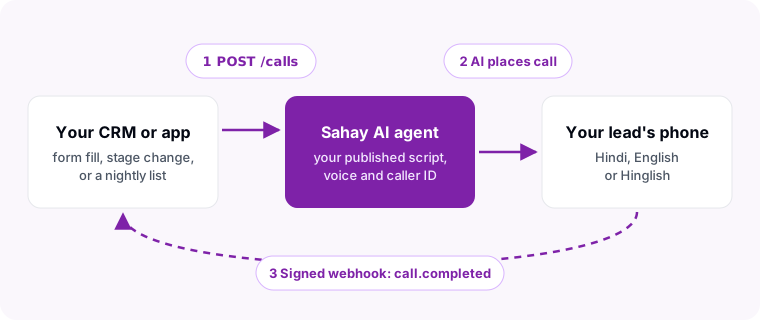
But if the moment that should trigger a call lives in your system (your CRM, your booking app, your loan origination tool) you don’t want a second dashboard. You want your system to say “call this person now, with this agent”, and to hear back when the call is over. That is what an AI calling API is for.
When an API Beats a No-Code Dashboard
For most teams, starting AI calls from a dashboard is enough: upload a list, pick an agent, press start. Reach for the API when one of these is true.
- The trigger lives in your own software. A form on your site, a stage change in your CRM, an abandoned checkout, an EMI that is due tomorrow. The API lets that event place the call within seconds, with no person in between.
- The result has to land back in your system. If your team works in your CRM, the call outcome should appear there, not in a tool they never open.
- You run calling at volume on a schedule. Creating campaigns, adding contacts and starting them from your own jobs beats a weekly spreadsheet upload.
- You are building a product. Agencies and software companies use an AI calling API to offer calling inside their own product, without building speech, telephony and an LLM stack themselves.
Eight Things to Check in Any AI Calling API in India
Global voice AI APIs are built for US numbers and English. An Indian deployment fails on different things. Ask every vendor these eight questions before you write code.
| What to check | Why it matters in India | How Sahay’s API does it |
|---|---|---|
| Indian caller ID | Unknown international or VoIP numbers get ignored or marked as spam. | Each agent calls from its assigned Indian number. No SIP trunk to bring. |
| Hindi and Hinglish | Most callers switch languages mid-sentence. An English-only agent loses them. | API calls use your published agent, so the same Hindi, English or Hinglish voice and script. |
| Do-not-contact checks | Calling someone who opted out is a compliance and brand problem. | Blocklisted numbers and do-not-contact leads are refused before dialling. |
| Safe retries | A network retry from your server should never phone a lead twice. | Idempotency-Key header: a repeat returns the existing call. |
| Signed webhooks | Anyone can POST to your endpoint. You need to know it was really your provider. | HMAC-SHA256 Sahay-Signature with a timestamp, retried twice on failure. |
| Clear rate limits | Surprise throttling breaks a campaign halfway through the day. | Per-account limits returned on every response in X-RateLimit-* headers. |
| Script versioning | Editing a live script without a rollback is how a bad prompt reaches 500 leads. | Edit a draft, publish a version, roll back in one call. |
| Billing you can predict | Per-minute rounding and hidden platform fees change the real cost per lead. | Same AI voice minutes as dashboard calls. See AI calling agent pricing. |
What Sahay’s AI Calling API Covers
The API is a REST API over HTTPS with JSON bodies. It covers the four things you need to run AI calling from your own system.
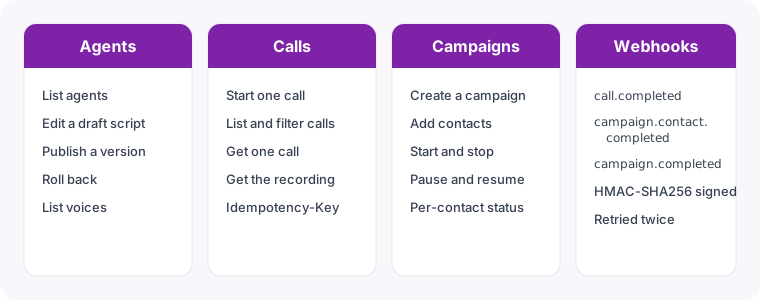
/api/public/v1.- Agents. List your AI agents and the voices available, edit an agent’s draft script, publish it as a new version, and roll back to an earlier version.
- Calls. Start one call to one number, list and filter calls by status, agent or date, fetch one call’s details, and fetch its recording.
- Campaigns. Create a calling campaign, add contacts with a name and your own variables, then start, pause, resume or stop it, and read each contact’s status.
- Webhooks. Register one HTTPS URL and pick the events you want:
call.completedfor every call,campaign.contact.completedas each campaign contact finishes, andcampaign.completedwhen a whole campaign ends. Your system never has to poll.
Every endpoint, field, error code and webhook payload is documented in the Sahay API reference at docs.sahay.io, with copy-paste examples in cURL, Python and Node.
Start an AI Call With One Request
Authenticate with an API key in the Authorization: Bearer header (or X-API-Key). Send the agent to use and the lead’s number in E.164 format. Anything you put in metadata, such as your own lead ID, comes back to you on the call and its webhook, so you can match the result to your record.
curl https://sales.sahay.io/api/public/v1/calls \
  -H "Authorization: Bearer $SAHAY_API_KEY" \
  -H "Idempotency-Key: lead-48213-first-call" \
  -H "Content-Type: application/json" \
  -d '{
    "agent_id": "YOUR_AGENT_ID",
    "to_number": "+919876543210",
    "metadata": { "crm_lead_id": "48213", "source": "website-form" }
  }'
The API answers 202 Accepted with the new call and its status straight away. The call itself happens in the background. If the agent has no published version, its number is paused, or the plan has no AI voice minutes left, you get a clear error code (agent_not_published, agent_number_paused, insufficient_voice_minutes) instead of a silent failure.
Get the Result Back With a Signed Webhook
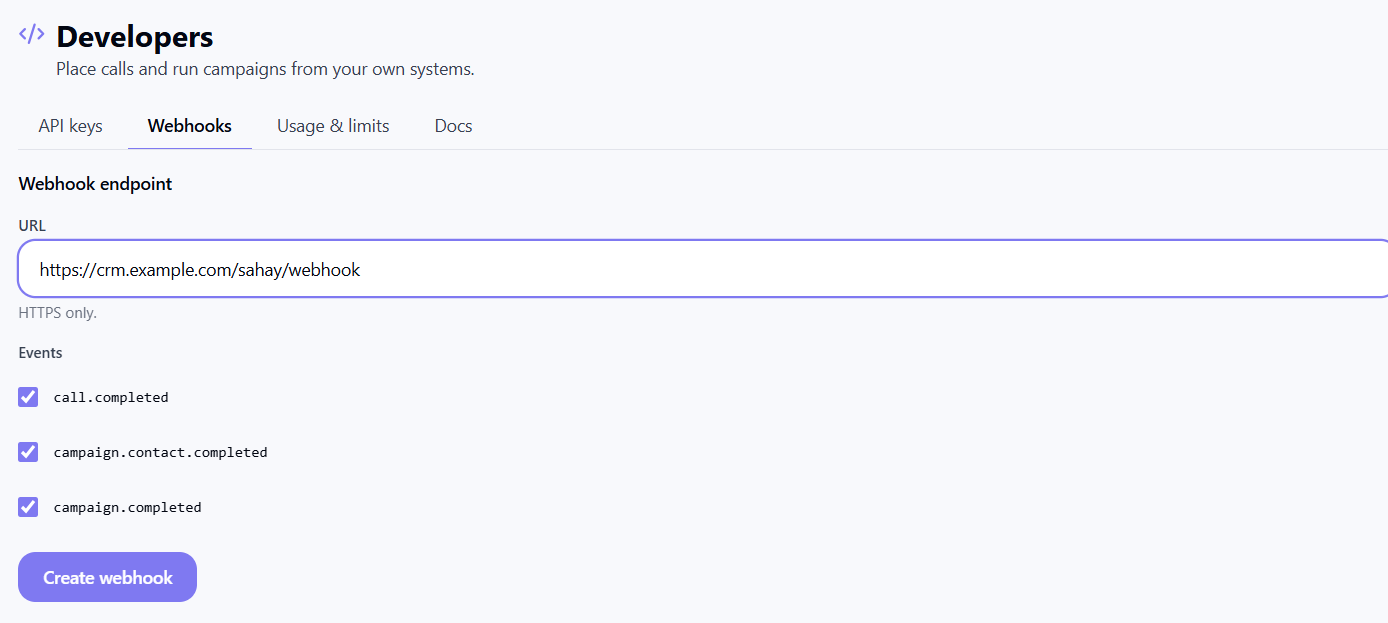
When the call ends, Sahay POSTs a call.completed event to your webhook URL. It carries the call ID, the agent, the number, the final status, the duration, the end time and your metadata. Every delivery has a Sahay-Signature header of the form t=<unix time>,v1=<HMAC-SHA256>, computed over the timestamp and the raw body with your webhook secret. Check it before you trust the event:
import hmac, hashlib, time

def verify(secret: str, header: str, raw_body: str, tolerance=300) -> bool:
    # header looks like: t=1762588800,v1=5f2b...
    parts = dict(p.split("=", 1) for p in header.split(","))
    t, sig = parts.get("t"), parts.get("v1")
    if not t or not sig or abs(time.time() - int(t)) > tolerance:
        return False
    expected = hmac.new(secret.encode(), f"{t}.{raw_body}".encode(),
                        hashlib.sha256).hexdigest()
return hmac.compare_digest(expected, sig)Limits, So Nothing Surprises You
- Requests: 30 a minute per account by default, raised on request for higher volumes. Every response tells you where you stand in
X-RateLimit-Limit,X-RateLimit-RemainingandX-RateLimit-Reset. - Calls in progress: 2 live API calls at a time by default, also raised for larger teams. Campaigns are the better tool for calling a long list.
- Keys: up to 10 active keys per account, so each system gets its own key and you can revoke one without touching the others.
The API docs list every error code and the rate-limit headers in full.
Three Patterns Teams Build First
- Speed-to-lead. Your website form handler calls
POST /callsthe moment a lead submits. The AI qualifies them while they are still interested, and the webhook moves the lead to the right stage in your CRM. - Reminders and renewals. A nightly job creates a campaign with everyone whose payment, appointment or renewal is due, adds their details as contact variables, and starts it at 10 am.
- Re-engaging cold leads. Pull leads that went quiet 30 days ago from your CRM, run a short check-in campaign, and route the ones who say yes to a person.
If your team doesn’t have its own CRM yet, you don’t need the API at all: Sahay’s own CRM starts AI callbacks for new leads on its own. Our AI CRM comparison explains how, and how Sahay compares with other AI calling agents covers the product side.
Frequently Asked Questions
Do I need my own telephony or SIP trunk to use the API?
No. Each AI agent is assigned an Indian number to call from, and calls placed through the API use that number. You send the lead’s number and the agent to use; Sahay handles the dialling.
Can the AI agent speak Hindi on API calls?
Yes. An API call uses the same published agent, script and voice as a call you start from the dashboard, so it speaks Hindi, English or Hinglish exactly as you configured it.
How is an API call billed?
From the same AI voice minutes as every other AI call on your plan. If the plan has no AI voice minutes, the API refuses the call with a 402 instead of dialling.
What happens if my system sends the same request twice?
Send an Idempotency-Key header with each call request. A repeated key returns the call that already exists instead of phoning the lead a second time.
Will the API call numbers on our do-not-contact list?
No. Before dialling, Sahay checks your organisation’s blocklist and do-not-contact leads, and refuses the call if the number is on either.
How do I get access?
The API is switched on per account. Talk to our sales team and we will enable it and help you set up your first agent and webhook.
Hear the AI agent on your own phone first, then and we will switch the API on for your account.